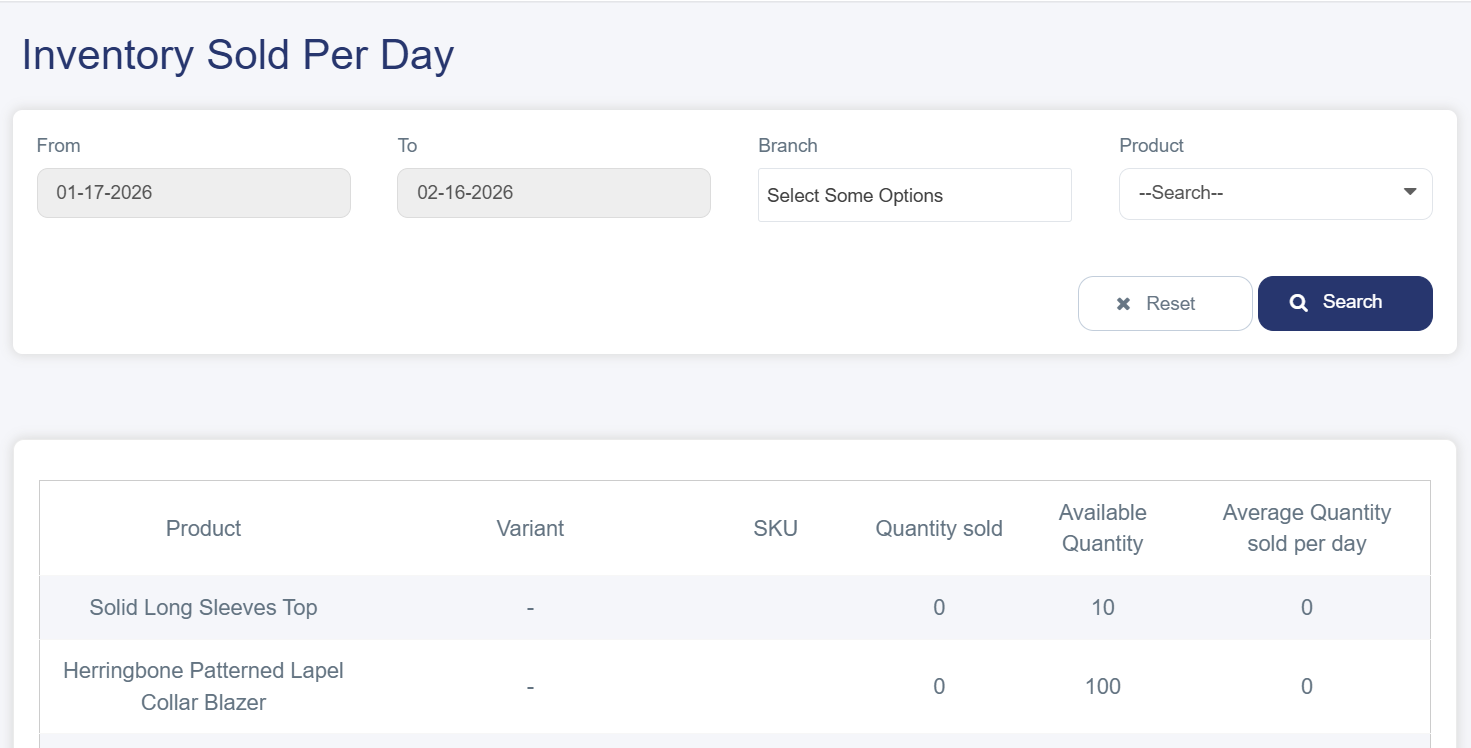
What is the Inventory Sold Per Day
The Inventory Sold Per Day is one of the most important analytical tools provided by Cartley for online store owners. It helps track sales performance accurately and in detail, enabling merchants to make strategic decisions based on real data about sales activity and inventory movement.
The importance of this report lies in its ability to provide store owners with a comprehensive overview of:
· Inventory Tracking: Knowing the available and sold quantities of each product to avoid stockouts or overstocking.
· Performance Analysis: Identifying best-selling and slow-moving products to improve sales strategies.
· Future Planning: Making purchasing and marketing decisions based on actual data.
· Profit Calculation: Understanding the average daily quantity sold to estimate expected revenues.
How to Access the Inventory Sold Per Day
1. From the main menu on the right side of the dashboard, navigate to the Inventory Reports section.
2. A drop-down list will appear showing various report types — select Inventory Sold Per Day
3. You will be directed to the report page, which includes:
Filtering and Search Tools
At the top of the page, you will find tools that help you customize the displayed data:
· Date Field (From - To): Specify the desired time period to display sales within it.
· Branch List: Select a specific branch or display data for all branches.
· Product Field: Choose a specific product or a group of products.
· Search Button: Apply the filters to retrieve the required results.
Detailed Data Table
The table displays the following information for each product:
· Product: Product name.
· Variant: Additional product details such as size or color.
· SKU: Stock Keeping Unit.
· Quantity Sold: The number of items sold during the specified period.
· Available Quantity: Quantity currently in stock.
· Average Quantity Sold Per Day.