What is t he Inventory History Report on Cartley
The Inventory History Report is one of the essential tools provided by Cartley for online store owners to monitor and track inventory movements with high accuracy. It serves as a detailed record of all product transactions, enabling store owners to trace changes and make informed decisions regarding inventory management.
This report is a vital tool for efficiently managing your store, as it provides:
- Full Transparency: Track every action affecting inventory with precise details.
- Control and Accountability: Monitor inventory modifications made by different employees.
- Strategic Analysis: Plan procurement and stock operations based on historical data.
- Issue Management: Trace the source of unexplained inventory shortages or surpluses.
How to Access the Inventory History Report
- From the main dashboard, navigate to the Inventory Reports section.
- A drop-down list will appear; select Inventory History.
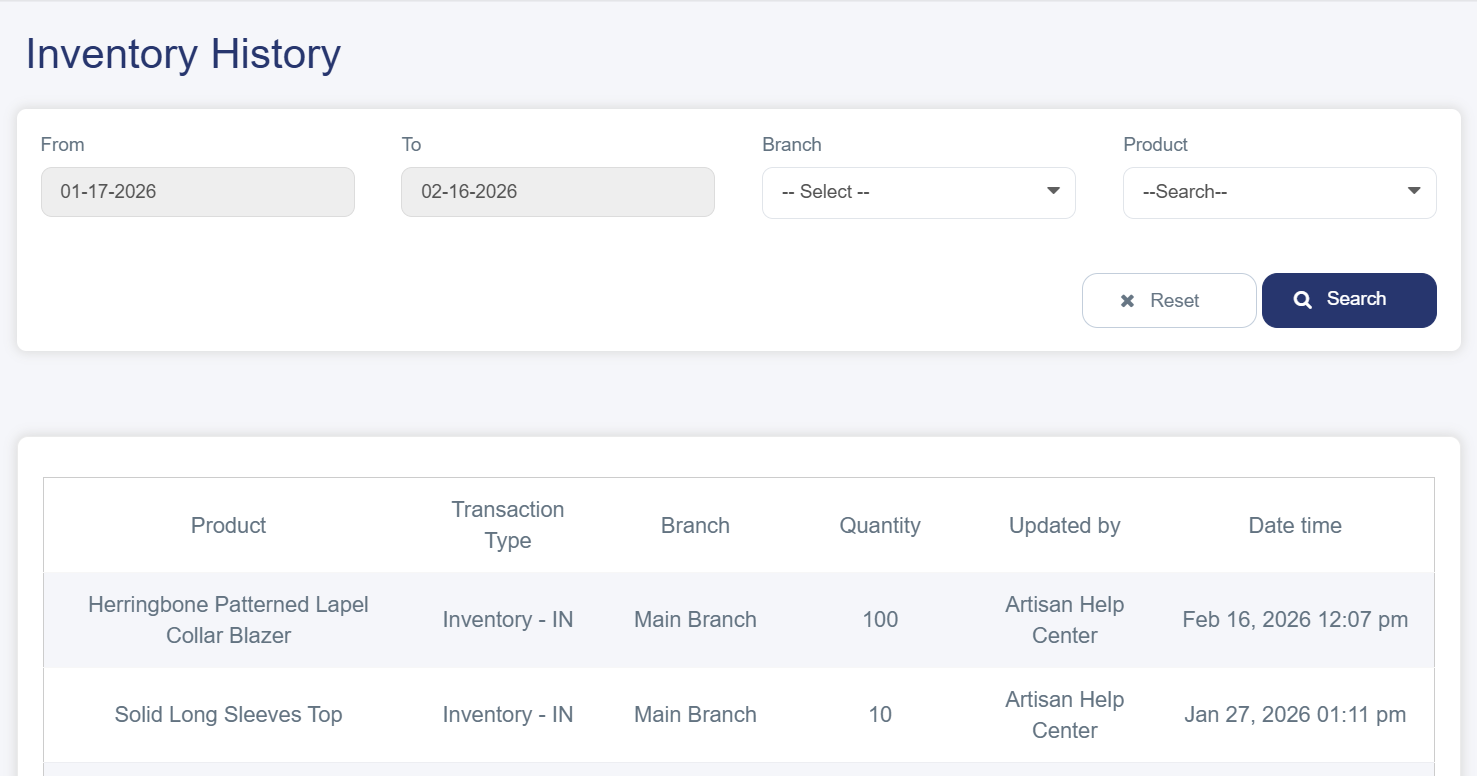
- You will be directed to the report page, which consists of several sections:
Filtering and Search Tools
At the top of the page, you will find tools to customize the displayed data:
- Date Field (From – To): Specify the desired period to view inventory movements.
- Branch: Select a specific branch or view data for all branches.
- Product Field: Choose a specific product .
- Search Button: Apply the filters to retrieve the desired results.
Data Table
The table displays a complete record of inventory movements with the following columns:
- Product: The name of the product involved in the inventory action.
- Transaction Type: Indicates the nature of the inventory movement. Common types include:
§ Sale Out: Direct sale to a customer.
§ Inventory – In: Addition of new quantity to the inventory.
§ Transferred: Transfer products between branches
§ Return: Automatically returning products to inventory when an order is canceled
- Branch: The branch where the transaction took place.
- Quantity: The total number of items whose inventory quantity was affected.
- Updated By: The username or system that performed the modification.
- Date & Time: The exact timing of the transaction.