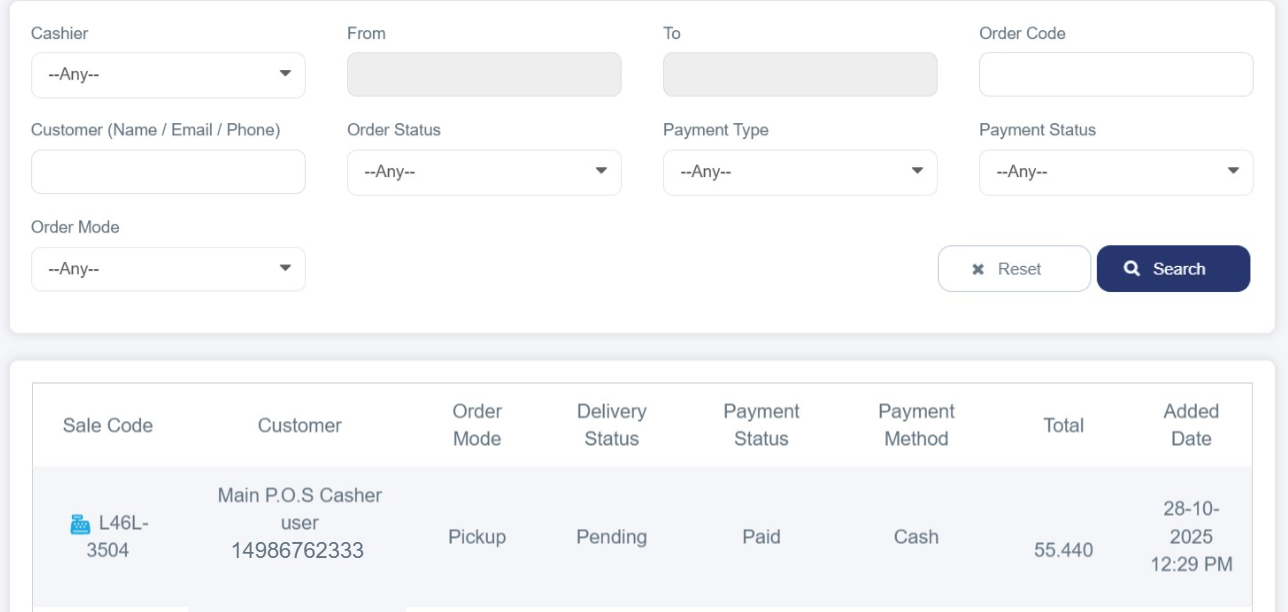
Cashier Sales Report
It is a specialized detailed report that displays all sales transactions carried out by a specific employee at a point of sale. It can be accessed by following these steps:
1. Log in to your store dashboard on Cartley.
2. From the main menu, select "Reports".
3. A dropdown menu will appear; choose "Cashier Sales Report". Through this section, you can search for a specific cashier to review their performance using advanced filter tools that allow you to specify:
· Cashier name
· Time period (from – to)
· Order Code
· Customer name
· Order status
· Payment status and type
· Order Mode
After applying the filters, detailed sales data will be displayed in a well-organized table, clearly showing order and customer information.